The Kick clipper that never looks away.
Kick streams run for hours and the best moment is always the one you missed. Clipinator watches Kick streams on your PC and clips the spikes on its own, framed for Shorts and captioned word by word.

Auto-clips Kick live
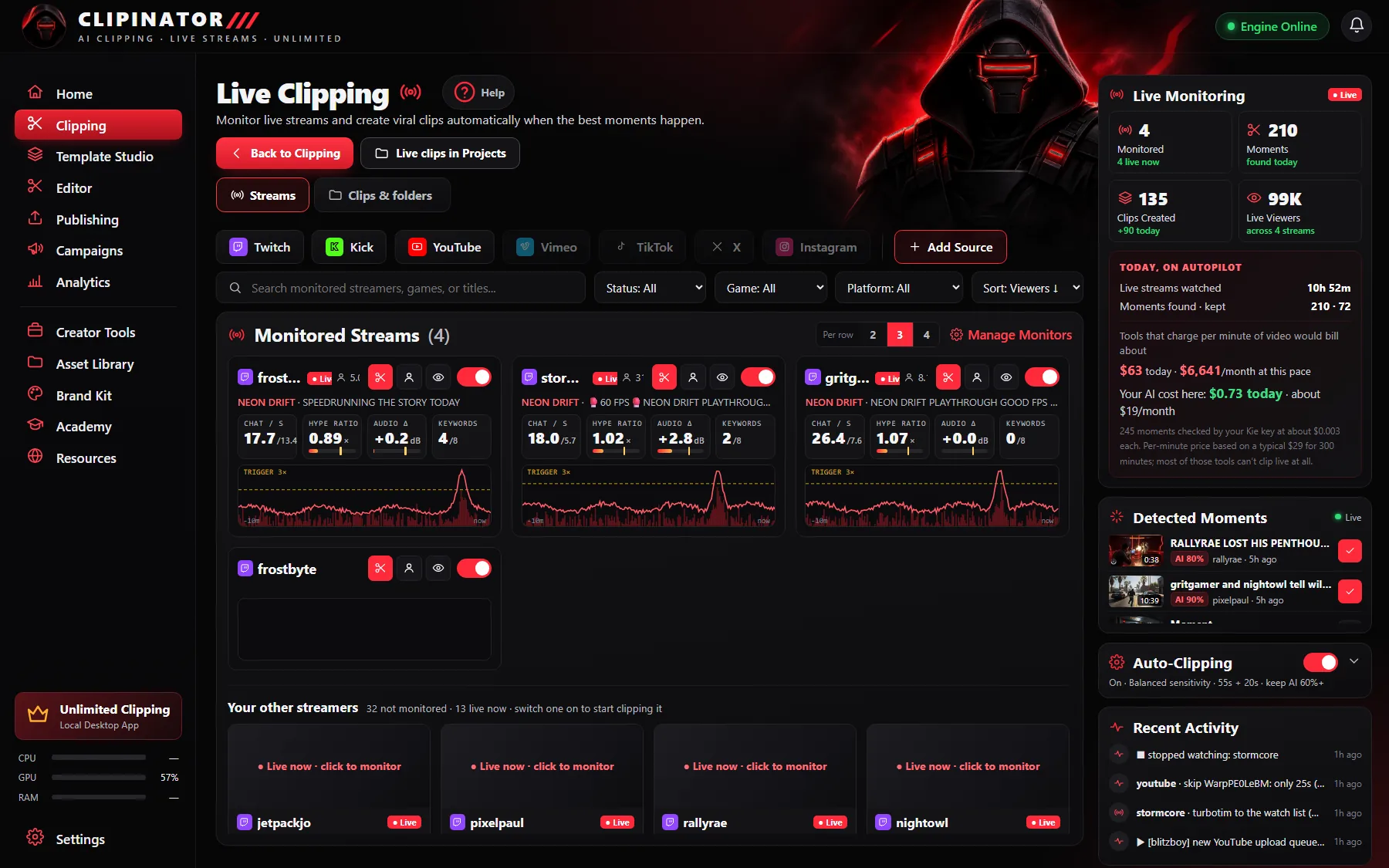
Add a Kick channel and Clipinator watches chat and audio, clipping the spikes with the build-up and payoff.
Clip it now
See something good? The red scissors on the tile clips that moment immediately.
Watch inside the app
The eye button shows the stream about 15 seconds behind live: exactly what the clipper sees.
Folders per stream
Every streamer is a folder and every stream inside it, so a night of Kick streams stays tidy.
Built for long, chaotic streams
Kick's IRL, gaming and Just Chatting streams are made for clips, but nobody can watch them all. Add the channels to Live clipping, set the face box, format and caption style once per streamer, and let your PC do the watching. Sensitivity, lead-in and follow-through decide how often it clips and how much of the moment it keeps.
From Kick to TikTok, Shorts and Reels
Clips come out 9:16 with captions and a title. Approve the good ones and publish or schedule them through your own Postly account, or post them yourself. Step by step: how to clip Kick streams.
Questions
Can Clipinator clip Kick streams?
Yes. Live clipping watches Kick streams in real time and clips the best moments automatically, alongside Twitch and YouTube.
What format works best for Kick clips?
Streamer Split (face on top, gameplay below) for streams with a face cam, Full Gameplay for IRL and Just Chatting, or Blurred Fill to keep the whole frame.
Is there a limit on Kick clips?
No. Clipping runs on your own PC, so there are no credits or minute caps. Starter monitors 2 live streamers; Pro Clipper as many as your PC can handle.
Do I need permission?
Yes. Only clip your own channel, a campaign you joined, or a streamer who said yes.
Clip Kick on autopilot
Unlimited clips on your own PC, from $29 a month. No credits, cancel anytime.
Guides