How to Find Clipping Campaigns That Actually Pay
A clipping campaign pays you for the views your clips get. The trick is picking campaigns you can actually win, then clipping them faster than everyone else.
What a clipping campaign is
A streamer, brand or agency puts up a budget and a rate, for example a fixed amount per 1,000 views. Clippers post clips of that streamer's content to their own TikTok, YouTube Shorts or Instagram Reels, submit the links, and get paid on verified views until the budget is used up.
Where to find campaigns
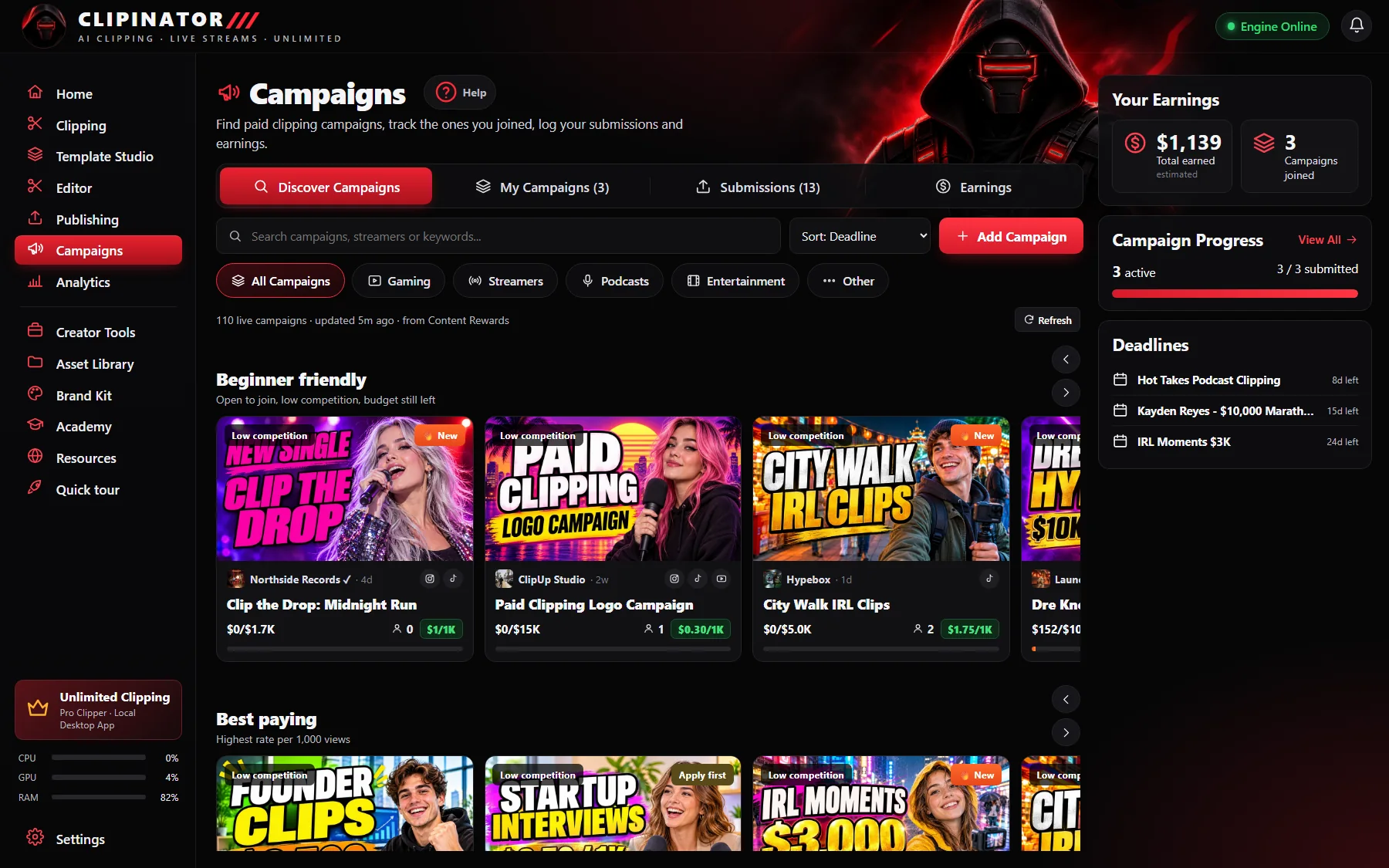
Most campaigns are listed on clipping marketplaces such as Content Rewards, which runs on Whop. Each listing is a card showing:
- Rate: what you earn per 1,000 verified views.
- Budget: the total pot, and how much of it is left.
- Creators joined: how many clippers are competing for that budget.
- Rules: which platforms count, clip length, format, and what you may or may not show.
Inside Clipinator, Campaigns → Discover lists live campaigns from Content Rewards, refreshed every few hours, with its own GTA VI row. You can search, sort by deadline or filter by type, then open a card to read the brief and join it on the marketplace.
How to pick a campaign you can win
- Budget left vs. creators joined. A big budget with 300 clippers can pay less per head than a small one with five.
- A streamer who goes live often. More streams mean more moments, and more clips.
- Rules you can follow at volume. If a campaign wants clips on three platforms with a specific format, make sure your setup does that automatically.
- Deadline. Campaigns close. Join early, clip early.
Clip the campaign faster
Once you've joined, add the campaign's streamers in Live clipping. Clipinator watches them live and clips the spikes, or you can paste their VODs into Long video → Shorts to catch up on streams you missed. Set the format and caption style per streamer once, and every clip comes out campaign-ready. More on that in turning Twitch clips into Shorts automatically.
Track it, or you'll lose track
After you join, press Add Campaign in Clipinator and enter the rate, deadline and streamers. Log each submission with its link and views in Submissions; your earnings add up in Earnings and in Analytics. Campaign tracking is part of the Pro Clipper plan.
Stay inside the rules
Campaign rules decide which streamers, platforms and formats count. Break them and your views won't be approved. Only clip what the campaign allows.
Questions
Where can I find clipping campaigns?
On clipping marketplaces such as Content Rewards. Clipinator’s Campaigns tab lists live campaigns from Content Rewards, refreshed every few hours, so you can browse them next to your clips.
How much do clipping campaigns pay?
Each campaign sets its own rate, usually per 1,000 verified views, and pays until its budget runs out. Your earnings depend on the rate, the rules and how your clips perform.
How many campaigns should I join?
As many as you can clip well. A tool that clips live streams automatically lets you cover more streamers at once, as long as you follow each campaign’s rules.
Do I need Pro to track campaigns?
Campaign tracking and earnings are part of the Pro Clipper plan. You can browse campaigns and clip on any plan.
Clip it all on your own PC
Clipinator watches streams and long videos, finds the best moments and turns them into captioned Shorts. Unlimited clips, no credits, from $29 a month.