AI Clip Maker That Runs on Your PC (No Credits, No Watermark)
Most AI clip makers live in the cloud and charge by the minute or by the clip. That works until you start clipping at volume. Here is what changes when the AI runs on your own PC.
How cloud clip makers charge
Cloud tools upload your video to their servers, process it there, and bill you for the time. That usually means monthly minute caps, credits that run out mid-month, or a watermark on the free tier. For a clipper doing dozens of videos a week, the meter becomes the business model.
What “runs on your PC” means
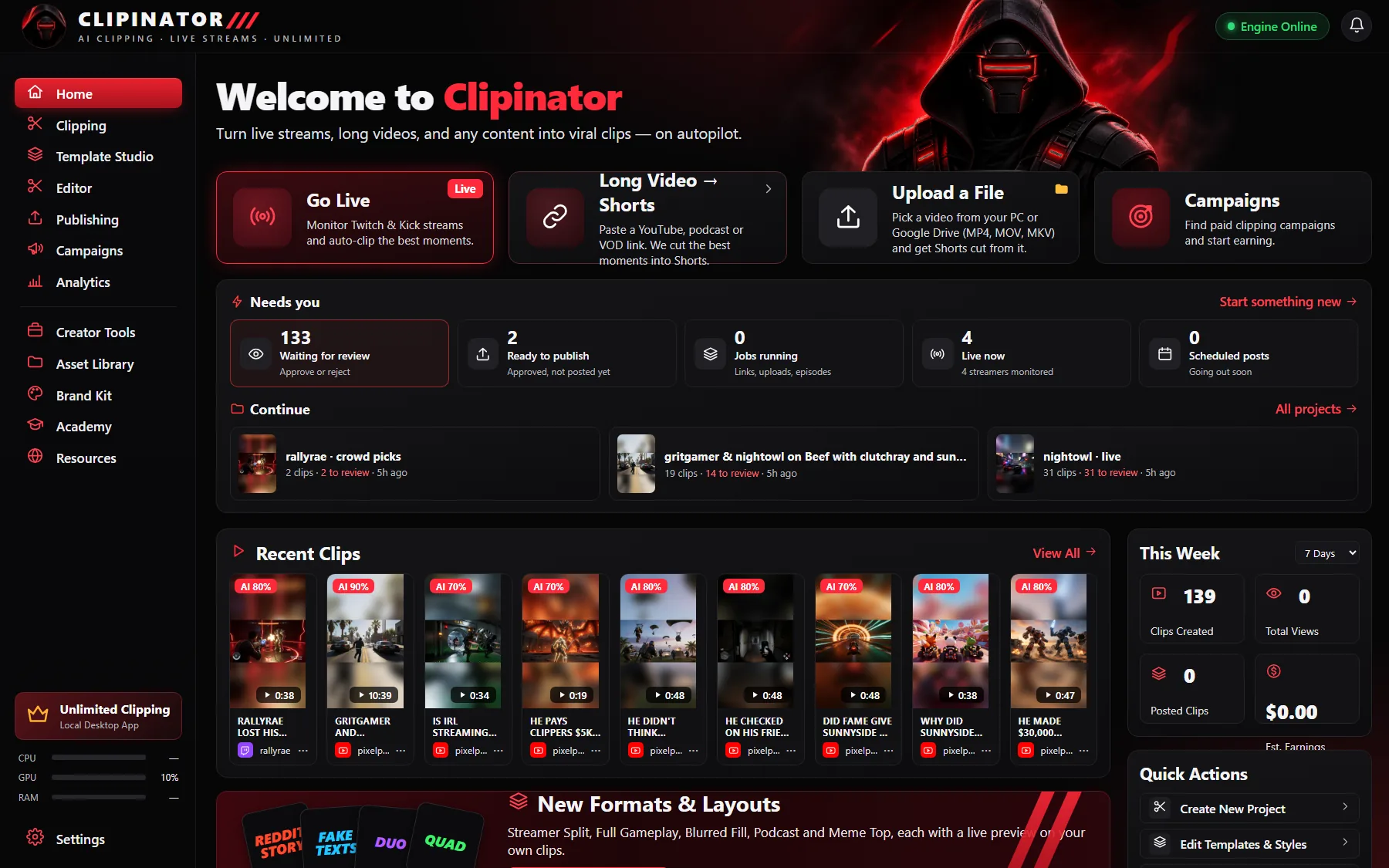
Clipinator is a Windows desktop app. Watching streams, finding moments, cutting, captioning and rendering all happen on your own computer. That's why there are no credits and no minute caps: the only limit is what your PC can handle. A Windows 10 or 11 PC with 16 GB of RAM is enough; a graphics card is optional and just makes rendering faster.
Three ways to run the AI
The AI picks the best moments and writes the titles. In Settings → AI Engine you choose:
- No key: the free built-in AI. It runs on your PC and costs nothing. Picks are looser and titles simpler.
- An OpenAI key (recommended). Faster and sharper. About 1¢ per finished clip, paid straight to OpenAI, never marked up by us.
- A Kie key. A cheaper alternative. Add both keys and one becomes the backup.
Leave Mode on Auto: the free AI throws out the weak moments first, so your key only pays for the clips worth keeping. Daily cap sets the most your key can spend in a day (default $1), after which the free AI takes over until midnight. If the cloud AI ever fails, the free AI steps in, so no clip is lost.
What the AI clip maker does
- Live streams: watches Twitch, Kick and YouTube and clips the spikes as they happen.
- Long videos: paste a YouTube link, Twitch VOD or Google Drive link and get Shorts from it. See long video to short clips.
- Files: clip MP4, MOV, MKV and more from your PC, offline.
- Framing: Streamer Split, Full Gameplay, Blurred Fill or Podcast with face lock.
- Captions and hooks: word-by-word captions, a title and an AI score on every clip.
- Editor: trim, split, transitions, sound effects and zooms when you want to polish a clip.
No watermark
Clipinator only adds a watermark if you type your own @handle into it. Add your logo through a Brand Kit if you want one.
What it costs
The clipping itself costs nothing per clip because it runs on your hardware. The app is a flat subscription: Starter $29/month, Pro Clipper $59/month, Agency $149/month, with yearly plans saving up to 44%. Every plan clips unlimited YouTube links and VODs.
Questions
Is there an AI clip maker without a watermark or credits?
Clipinator only adds a watermark if you type your own @handle, and its built-in AI runs on your PC at no cost per clip. The app itself is a flat monthly plan from $29.
Do I need an OpenAI key?
No. Clipinator works with its free built-in AI. An OpenAI key is optional for sharper titles, at about 1¢ per finished clip, with a daily cap you set.
Does it work on Mac?
Clipinator runs on Windows 10 or 11, 64-bit.
Do I need a graphics card?
No. 16 GB of RAM is enough. An NVIDIA card makes rendering faster.
Clip it all on your own PC
Clipinator watches streams and long videos, finds the best moments and turns them into captioned Shorts. Unlimited clips, no credits, from $29 a month.